How to listen to web articles, even offline
Turn a web article into clean audio on Mac, iPhone, or iPad. How it works, how it compares with Safari's Listen to Page, and what happened to Pocket.
In short: Paste a link, keep the article without the clutter, and listen offline. Paywalled pages are the one thing it can't do.
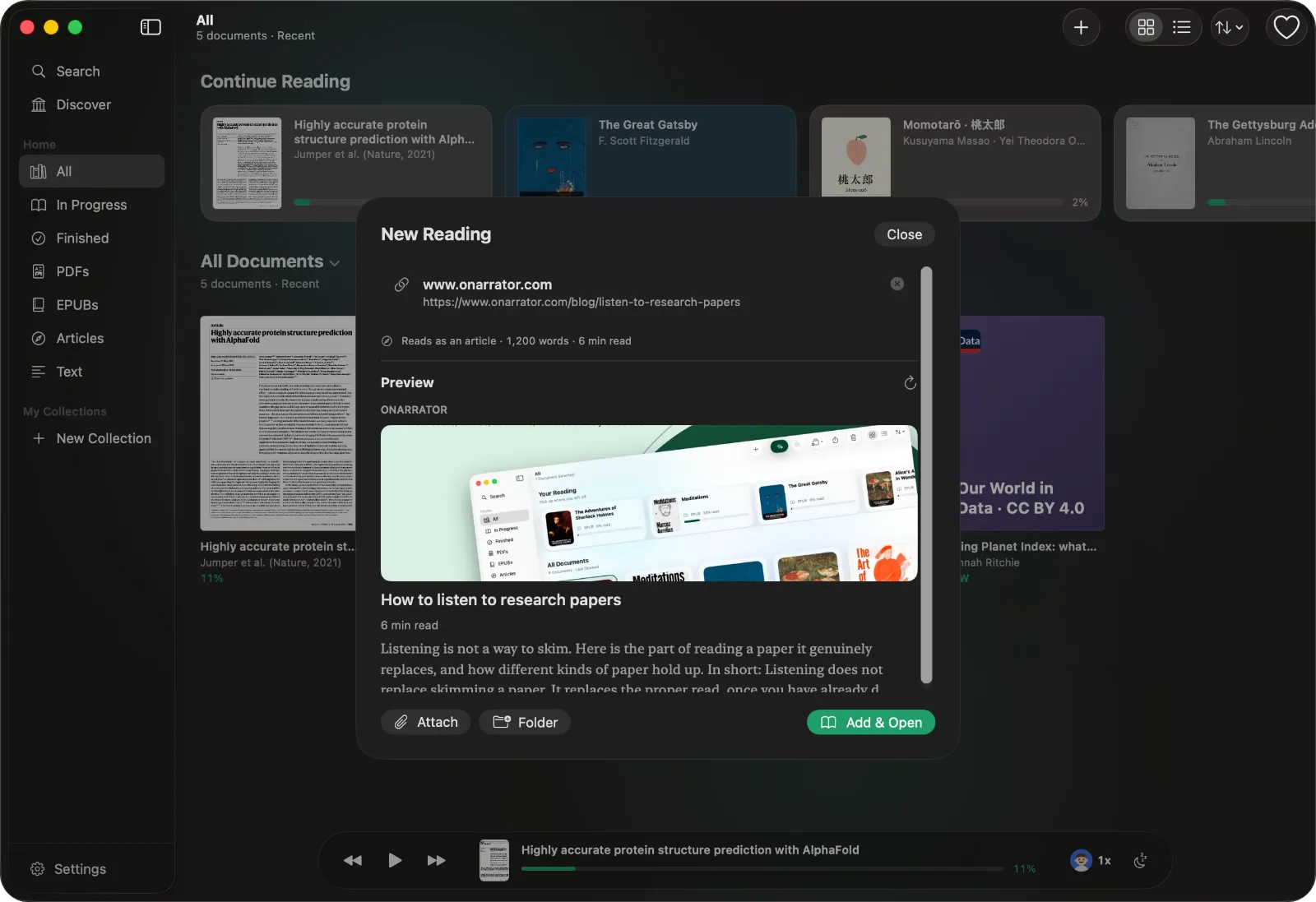
To listen to a web article, paste its link into ONarrator. It loads the page, keeps the article and drops everything around it, and reads it aloud with a natural voice on your Mac, iPhone, or iPad. Generate the audio before you leave and it plays with no connection.
If you only want to hear the page in front of you right now, Safari can do that too. This guide covers both, plus what doesn't work and where the read-later apps went.
The quick way: Safari's Listen to Page
Since iOS 17, Safari can read a page aloud. Open the page, tap the Aa button in the address bar, and choose Listen to Page. It keeps playing in the background (AbilityNet).
It's good for one article, now. It reads only the page you have open, it doesn't keep a list, and it's grayed out on pages Safari can't simplify into Reader view (Dave Rupert).
Save an article to listen to later
ONarrator is for the articles you mean to get to: you add them now and listen on a walk, a drive, or a flight.
- Copy the article's link.
- Open New Reading in ONarrator and paste it. On a Mac you can also drop a link into it. A preview shows what will be imported.
- Choose Add & Open. The article is saved in your library.
- Press play, or tap any sentence to start there.
- Generate the audio if you'll be offline later.
How the page gets cleaned up
A news page is mostly not the article. There's a cookie banner, the menu, a newsletter sign-up, ads, related stories, and share buttons. Read aloud, that is a minute of noise before the first sentence.
ONarrator loads the page in a hidden browser and waits for it to finish loading, so pages that build their content with JavaScript work. Then it runs Readability, the open-source library behind Firefox's Reader View, to find the article. You get the headline, the text, quotes, lists, and the article's own images. The rest is left behind.
Readability is good but not perfect. On an unusual layout it can miss a section or keep something it shouldn't. If an article looks wrong in the preview, that's what you'll hear.
Listen offline
The voices run on your device, so once an article is in your library, listening doesn't need the internet. Generating the audio ahead of time means it plays instantly in a tunnel or on a plane, without pausing to catch up.
An article is a good length for this. At an audiobook narrator's average of about 155 words per minute (ACX), a 2,000-word article is about 13 minutes: one walk, or part of a commute.
What doesn't work
- Paywalled and subscriber-only articles. ONarrator loads pages without your cookies or logins, so it sees what a logged-out visitor sees. For a paywalled article that's the preview, or nothing.
- Very short pages. If a page has less than a few sentences of article text, the import fails rather than reading the menu.
- Sharing from Safari. There's no Share sheet extension yet. Copy the link and paste it into New Reading.
If an article won't import but you can see it in your browser, select and copy its text and paste that instead. Pasted text becomes a document of its own.
Where Pocket and Omnivore went
A lot of reading lists lost their home recently:
- Pocket shut down on July 8, 2025. Mozilla allowed exports until October 8, 2025 (9to5Mac).
- Omnivore joined ElevenLabs, and its export ended on November 15, 2024 (ElevenLabs).
- Instapaper is still running and includes text-to-speech. Its paid plan adds a text-to-speech playlist (App Store).
ONarrator isn't a read-later service. It doesn't sync, and it doesn't import a Pocket export. It's for the articles you actually want to hear: add the ones you mean to read, and listen to them properly.
Questions
Can I listen to articles without an internet connection?
Yes. You need a connection to add an article. After that, generate the audio and it plays offline.
Can it read paywalled articles?
No. It sees the page the way a logged-out visitor does.
Does it work on iPhone and iPad?
Yes. Paste the link into New Reading on iPhone or iPad, the same as on a Mac.
Can it read newsletters?
If the newsletter has a web version, paste that link. Otherwise, copy the email's text and paste it into New Reading.
Is anything uploaded?
No. The page is loaded on your device, and the voice runs on your device. The app has no account and no analytics.
For longer reads, see how to listen to an ebook you already own. For articles in other languages, see listening in 31 languages.