
Hindi PDF read aloud: hear Hindi books on Mac and iPhone
ONarrator reads Hindi PDFs, EPUB books, and web articles aloud on your Mac, iPhone, or iPad, with a Hindi-speaking voice that runs on the device. It's free, nothing is uploaded, and there is no account.
एक स्पष्ट आवाज़ किसी भी पृष्ठ का अनुसरण करना आसान बना सकती है।
“A clear voice can make any page easier to follow.”
What it reads in Hindi
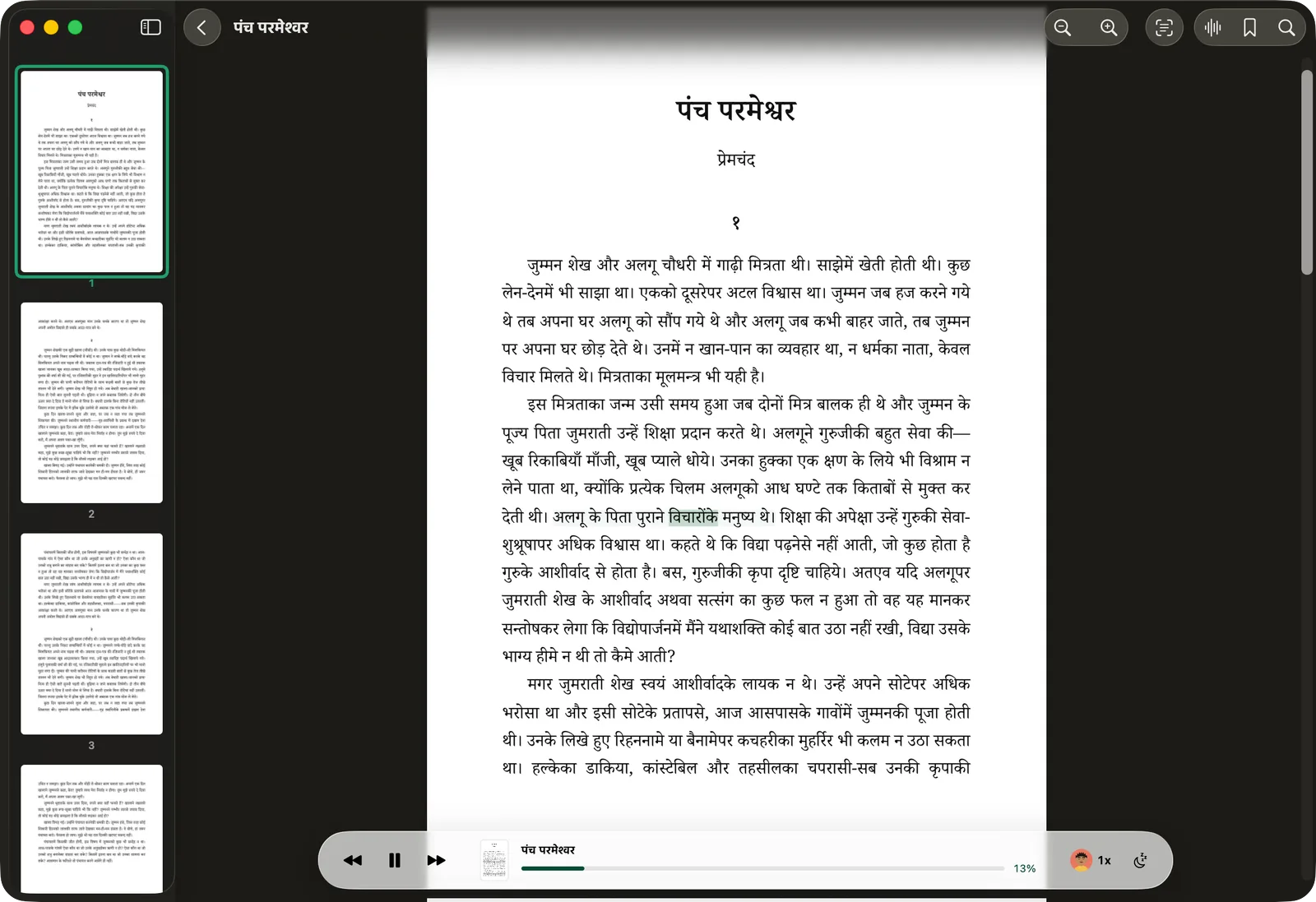
- PDFs. Hindi PDFs with real text in them, such as ebooks, reports, and papers saved as PDF. The page is shown as it is, and the sentence and word being read are highlighted on it.
- EPUB books. Hindi ebooks in the EPUB format, with their chapters and formatting kept.
- Web articles. Paste the link to a public Hindi web page, and ONarrator pulls out the article and reads it.
- Pasted text and text files. Paste Hindi text, or add a plain .txt file, and it's read the same way.
How it knows the text is Hindi
You don't choose the language. ONarrator reads the text, recognizes it as Hindi on your device, and hands it to one of its 10 Multilingual voices, each of which speaks Hindi.
If it guesses wrong, you can set the language for that document yourself, and it stays set.
Hindi PDFs in old fonts like Kruti Dev
Many Hindi PDFs were typed in fonts from before Unicode, such as Kruti Dev. These fonts draw Hindi letters on top of English keyboard codes. The page looks right, but the text inside the file is a string of Latin letters: आजis stored as “vkt”. A voice that reads the stored text reads out gibberish.
ONarrator converts the text of Kruti Dev 010, DevLys 010, and Walkman-Chanakya 905 back into Hindi before reading it. Walkman-Chanakya is the font of NCERT's Hindi textbooks. Only text set in those fonts is converted, so an English title or reference list on the same page keeps its own letters. The page itself is shown as printed, and the sentence and word being read are highlighted on it as usual.
Some Hindi PDFs store each letter cluster's correct spelling alongside the shapes drawn on the page, and ONarrator reads that spelling, so a vowel sign isn't heard out of place.
Books that mix Hindi and English
ONarrator decides the language of each sentence, not just the book. In a Hindi book, the Multilingual voice reads Hindi sentences in Hindi and English sentences in English.
An English book with Hindi passages is a little different. The English voices speak only English, so they skip a Hindi passage rather than mangle it. When you press play on an English book where more than 2% of the text is in another language, ONarrator tells you, for example, “This book has Hindi in it,” and offers the Multilingual voice. It asks once per book and remembers your answer.
How to listen to a Hindi PDF
- Add the document. On a Mac, drag a PDF or EPUB into ONarrator or choose it from a file picker. On iPhone and iPad, choose it from Files. For an article, paste its link.
- Press play. ONarrator works out that the text is Hindi and picks a Multilingual voice for it. Tap or click a sentence to play from it.
- Choose a voice, if you like. Open the voice panel and pick any of the 10 Multilingual voices. ONarrator remembers your pick and uses it for your next Hindi document. The same panel lets you set the language by hand if it guessed wrong.
Listening keeps going while you use other apps, with controls on the Lock Screen on iPhone and iPad. You can also prepare a whole book ahead of time with Generate Audio and export it as an M4B audiobook.
What doesn't work
- Scanned Hindi pages aren't read. A scan is a picture of a page, and the text recognition ONarrator uses on scans can't read Devanagari. Instead of reading out nonsense, the app says it can't read the scan's language. A Read Anyway button is there, but the app's own message warns that this would read out gibberish.
- Only some old fonts are converted. Kruti Dev 010, DevLys 010, and Walkman-Chanakya 905 are converted. Other pre-Unicode Hindi fonts, such as Chanakya or XpressChanak, are not. ONarrator goes by the font name the PDF records and doesn't guess from the text.
- Highlighting is estimated. With the Multilingual voices, the word highlight is worked out from the text, not timed from the audio. It can run slightly ahead of or behind the voice.
- Long sentences full of names. The Multilingual voice is weakest on long sentences dense with transliterated names. They stay understandable but carry an accent.
- Hindi words inside English sentences are skipped. In an English sentence, a Hindi word or phrase is left out of the speech, because reading it in the same breath garbled the English around it. The words stay on the page and in search.
What stays on your device
Nothing is uploaded. The Hindi voices ship inside the app, and the speech is made on your Mac, iPhone, or iPad, so a document in your library plays with no connection. There is no account, no analytics, and no ads.
Questions
Is it free?
Yes. ONarrator is free on the App Store for Mac, iPhone, and iPad, with no subscription, no account, and no ads. Optional tips unlock nothing; everything is free.
Does it work offline?
Yes. The Hindi voices ship inside the app and run on your device, so a Hindi PDF or book in your library plays with no connection. Nothing is uploaded.
Can it read a book that mixes Hindi and English?
Yes. ONarrator decides the language of each sentence, so with a Multilingual voice, Hindi sentences are read in Hindi and English sentences in English, in the same book.
Can it read a scanned Hindi book?
Not in this version. ONarrator can't recognize Hindi on a scanned page. It tells you it can't read the scan's language rather than read out nonsense. A Hindi PDF that has real text in it is read normally.
Does it read other Indian languages?
Hindi is the only Indian language among ONarrator's 31. A document in another language is read with Apple's built-in system voices instead, if your device has one for that language.
Further reading
Try ONarrator
Hear your next Hindi book.
Free on Mac, iPhone, and iPad. No account needed.